- Why SBI-Aadhar Link Matters More Than Ever Now?
- Things You Must Know Before Linking Your SBI A/C With Aadhaar
- Step-by-Step Guide To Link Your Aadhaar (UID) with Your SBI A/C
- 1. Check Your Registered Mobile Number
- 2. Type The Message
- 3. Time To Send the Message
- 4. Wait for Affirmation
- 5. Troubleshooting
- The Online Method through SBI mobile banking
- The Offline Method
- How to Link Aadhaar with an SBI Bank Account Offline?
- SBI Users Can Now Link Aadhaar Through The Nearest SBI ATM Also!
- Link Today; Bank Smarter Tomorrow
- Frequently Asked Questions (FAQs)
Stop Wasting Time! Link Aadhaar to SBI Instantly Using This SMS Trick
Why SBI-Aadhar Link Matters More Than Ever Now?
You are waiting for a direct benefit transfer or a government subsidy to hit your account. But it gets delayed. No pop-up alerts, no emails, and certainly no credit messages. Upon digging, you discover that your SBI A/C is not linked with Aadhar.
Considering SBI is the largest Indian Bank with over 50 crore regular customers, it is understandable that some people still have not completed the Aadhaar seeding SBI step. According to a PIB Press Release, 788 million Aadhaar numbers have been successfully connected to bank accounts as of now, and the number is rising sharply.
Aadhaar-bank A/C linking offers a host of government benefits that none of us would want to miss out on. You can receive your direct benefit transfers to your SBI A/C if it’s Aadhaar-linked. As of April 2025, the beneficiary coverage has surged 16X, compared with pre-DBT data. Simultaneously, you will be able to open an A PM Jan Dhan Yogna A/C only if you link your Aadhaar.
Given these drivers for linking your Aadhaar with Bank A/C, it is paramount for readers to know how to complete your sbi online aadhaar link by SMS banking. Here’s more on it.
Things You Must Know Before Linking Your SBI A/C With Aadhaar
Already searching “The Easiest Way to Link Aadhaar with SBI account” on Google? Wait! There are some prerequisites before you start the process.
Do you have an RMN?
Before Aadhaar linking, ensure your mobile number is linked to your bank A/C. To do that:
- Visit Your Bank physically (in-person visit for A/C holders is a must)
- Fill out a form, enter your mobile number, and have it linked instantly.
- To do it digitally, SMS your UID <Aadhaar Number> <Account Number> to 09223488888
- Fill out a form, enter your mobile number, and have it linked instantly.
Step-by-Step Guide To Link Your Aadhaar (UID) with Your SBI A/C
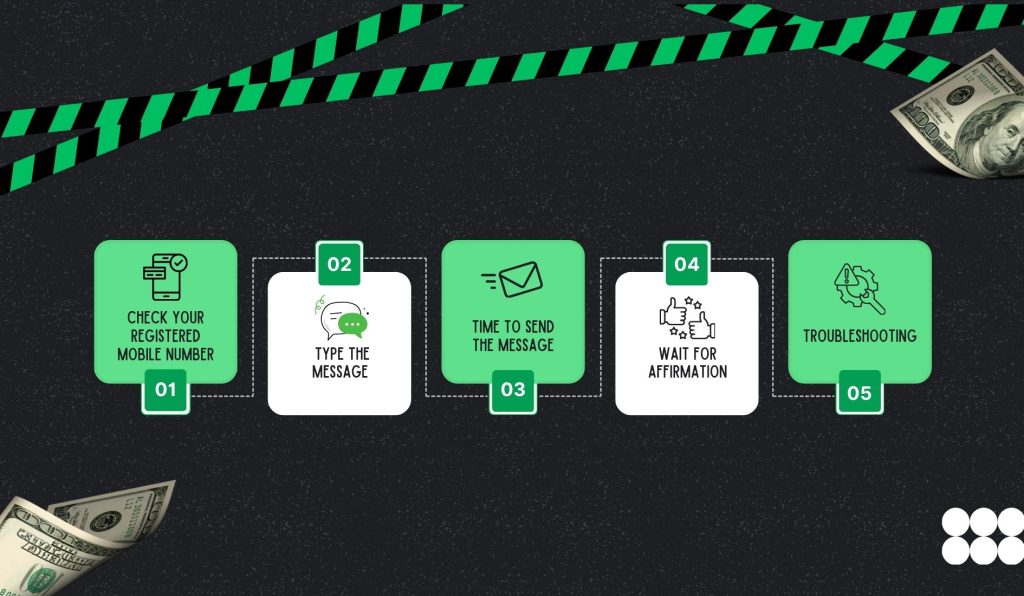
There is an easy 4-step process to do sbi online aadhaar link by sms. This hands-on step-by-step is a simplified sequence that anyone can follow.
1. Check Your Registered Mobile Number
Ensure that you have a working mobile number already linked to your SBI Account. You have to send an SMS from this RMN.
2. Type The Message
Go to your phone’s SMS application, and type in the following format:
UID <space> Aadhaar Number <space> Account Number
Example:
UID 123456789012 12345678901
3. Time To Send the Message
Send the message following this format to 567676, which is SBI’s official customer service contact number. That’s what you ned to do sbi online aadhaar link by sms.
4. Wait for Affirmation
You will get an SMS from the bank confirming that your bank A/C has been linked with your Aadhaar. If your application is not complete, you will receive a prompt with the further actions you need to take for sbi online aadhaar link by sms.
5. Troubleshooting
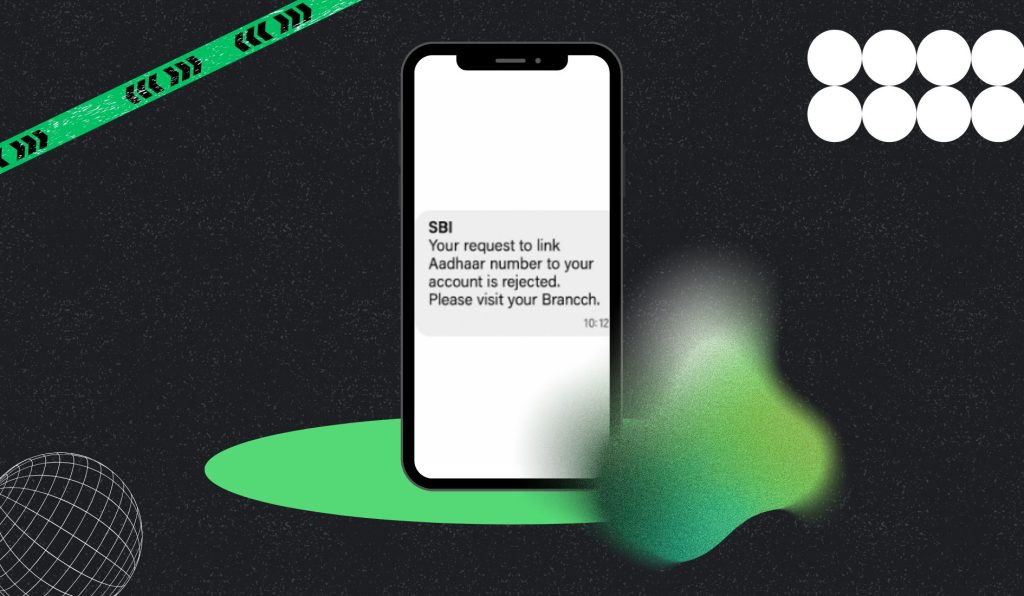
Did you receive this message after carrying out the 4 steps described above? Wondering what could have gone wrong?
Usually, the common errors that people make are entering an incorrect registered mobile number annd/or A/C no., but if you have entered these details correctly and the issue persists, you need to visit your bank branch, without delay!
How To Verify Aadhar Link Status for SBI Account Holders? Wondering if your Aadhaar has been flawlessly linked with your SBI Bank A/C? Often, your bank doesn’t send confirmation texts or pop-ups due to server glitches.
For SBI users, it is a common peril. In that case, it is really difficult for you to verify whether your Aadhaar has been successfully linked with your Bank A/C.
But wait. You can still confirm your linking status with some simple steps:
The Online Method through SBI mobile banking
- Go Online: Open onlinesbi.com. No shortcuts. Official site only.
- Login: Enter username. Password. Captcha. Hit submit. Done.
- Find the Option: Click My Accounts. Then Profile. Look for Aadhaar Linking Status. It’s there.
- Enter Aadhaar: Type your 12-digit Aadhaar number. Double-check. No typos.
- Hit Submit: Wait. A screen pops up. It says linked or pending. That’s your answer.
The Offline Method
Walk into your nearest SBI branch. Carry your Aadhaar card and your bank passbook. Head to the customer service desk. Ask for Aadhaar link status verification. The staff will check your account details in their system.
If linked, they’ll confirm immediately. If not, they’ll guide you to fill out a short Aadhaar seeding form. Submit the form with a photocopy of your Aadhaar. The bank updates the link within a few days. After it’s done, SBI will confirm it via SMS.
Quick tip: Go during non-peak hours to avoid long queues.
How to Link Aadhaar with an SBI Bank Account Offline?

The easiest way to link your Aadhaar with your SBI A/C is to follow the online method. But, if you still want to do it the physical way, here is the latest guide that covers all change in policies and the latest instructions implemented by SBI in 2025 for Indian customers:
Find an SBI branch near you. Visit during official hours. It is preferable to visit your home branch only. While you go, carry your official Aadhaar card (not any coloured photocopy) and a self-attested photocopy (passport size preferred). The third thing you need to bring is a photocopy of the Aadhaar card (self-attested).
Seek the Aadhaar linking form from the customer service counter. Fill it up. Pin the stated documents and keep your original Aadhaar card with you for validation.
After you submit the form, the executive will manually check your Aadhaar. That’s it. Nothing more from your end. The executive will accept the request and give you a receipt copy too. Preserve it until you receive a confirmation SMS.
SBI Users Can Now Link Aadhaar Through The Nearest SBI ATM Also!
Are you unable to access your net banking portal? You may visit the nearest branch. But many people don’t have the time to manually visit the branch, stand in line, and follow up. There is a third option for them, too.
You can now link your Aadhaar to an SBI Bank A/C at the nearest SBI ATM as well. Just follow these steps carefully:
Once this procedure is complete, you will receive an SMS confirmation on your registered number. Again, if you don’t get an SMS, visit your bank branch. Meanwhile, you can also complete the linking process from any SBI e-banking kiosk.
How to find a State Bank kiosk near me? Now you can easily find an SBI e-banking kiosk near you through some simple steps in under 20 seconds. Go to SBI’s website and open the branch locator. Enter your PIN Code, your “State”, and your “Circle”. Check out options like “E-Corner” to find out the available kiosks near you.
Link Today; Bank Smarter Tomorrow
Don’t wait for delays or missed credits. Linking your Aadhaar to your SBI account is no longer optional. It unlocks faster transfers, government benefits, and smooth banking.
The process is simple. SMS, online, ATM, or branch: pick what works for you. The best way is to complete your sbi online aadhaar link by sms. Millions of Indians have already done it. Why stay behind? Take 5 minutes now to link your Aadhaar and secure your account.
Make banking effortless. Tomorrow’s convenience starts with today’s action. If you still have any queries, message us. We will get back to you quickly!
Frequently Asked Questions (FAQs)
You can easily do that, using any of these three processes: SMS, online banking, or an SBI ATM. These methods save time and avoid queues at the branch.
You may miss out on subsidies and DBT benefits, and face restrictions on certain services, such as Jan Dhan account opening.
Check online via SBI net banking, or visit your branch. If your branch is far off, you can use the SBI ATM Aadhaar registration option. Open the article to know the steps.
Share this article: